Not until long ago, most sailors still relied on paper charts, handwritten logbooks, and weather forecasts crackling over the VHF. Phones stayed zipped inside waterproof bags until someone wanted a photo of the sunset. Now a single phone or tablet can handle nearly everything onboard.
Charts, tides, weather routing, anchor alarms, marina guides, even engine manuals during a charter. Plenty of crews now sail entire trips using nothing more than a tablet at the helm and a backup phone below deck. That convenience comes with a catch. App stores are crowded with subscriptions, overlapping features, and software that looks polished until you lose signal offshore.
Some apps quietly drain your battery by lunchtime. Others stop working for seemingly no reason. So instead of listing every sailing app on the market, this guide focuses on the ones sailors actually keep using.
Navigation tools that hold up underway. Weather apps people check before sunrise. Cruising guides that help when you arrive in a new anchorage just before dark. Whether you own a yacht or charter one once a year, these are the apps worth downloading before you leave the marina.
Navigation Apps
Navigation apps have changed fast over the last few years. What used to require dedicated hardware now runs comfortably on a phone or tablet. Some sailors still prefer traditional chartplotters at the helm. Others navigate almost entirely from a tablet.
Savvy Navvy
If Google Maps built a marine navigation app, it would probably look a lot like Savvy Navvy. The first thing people notice is the interface. It’s clean, simple, and doesn’t feel like software designed in 2007. That matters more than it sounds. Many marine apps still bury important information under layers of cluttered menus and tiny buttons. The routing is the reason many sailors stick with it. Instead of drawing a straight line between two points, Savvy Navvy calculates routes using weather, tides, currents, depth, and wind direction. The app even estimates when you’ll need to tack rather than sail directly toward your destination.
A few years ago, route planning like this required expensive software and a free afternoon. Now it takes a few taps. The app also includes marina details, anchorage information, AIS traffic overlays, and tide data from thousands of stations worldwide. For coastal cruising, it covers nearly everything most sailors need in one place. Pricing sits around €50 to €70 per year depending on the plan, with a 14-day free trial available. iOS and Android.
C-MAP Embark
C-MAP Embark feels cleaner and less crowded than some older navigation apps. If you already use C-MAP chartplotters onboard, the ecosystem fits together naturally. The charts come from official hydrographic sources, and route planning stays refreshingly straightforward.
Weather overlays, tide information, and marina points of interest are built in without making the app feel overloaded. The free version gives enough functionality to test properly before paying for premium charts and offline downloads.
Pricing typically runs around €20 to €30 per region each year. iOS and Android.
OpenCPN
OpenCPN sits at the opposite end of the spectrum from polished subscription apps. It’s free, open source, and incredibly helpful if you’re willing to spend some time learning it. The software supports NOAA charts, AIS integration, weather overlays, NMEA instruments, plugins, and just about every customization imaginable.
The interface definitely feels old-school. Nobody downloads OpenCPN because it looks pretty. But technically-minded sailors love it because it gives them control. No locked ecosystem. No yearly fees. No disappearing charts because a subscription lapsed while crossing the Atlantic. Setup takes patience, especially the first time around. Once configured properly though, OpenCPN can become a genuinely serious navigation system.
Free on Windows, Mac, Linux, and Android. Weather Apps Good weather data changes everything at sea. Better forecasts mean smoother passages, smarter departure windows, and fewer miserable nights trying to sleep in a rolling anchorage. These are the apps sailors keep checking over coffee before casting off lines.
Windy
Windy has become almost universal among sailors, kiters, surfers, and pilots for one simple reason: the visual forecasts are excellent. The animated wind maps make weather systems immediately understandable. You can zoom into a bay and instantly see how the wind bends around headlands or funnels through channels.
Text forecasts rarely communicate that clearly. Switching between forecast models takes seconds, which helps when one model looks wildly different from another. ECMWF, GFS, ICON, it’s all there. The app also handles waves, rain, pressure systems, thunderstorms, tides, and cloud cover without becoming difficult to navigate.
For coastal cruising, the free version already covers what many sailors need. Premium adds historical data and removes ads for around €20 per year. iOS, Android, and web.
PredictWind
PredictWind is built for sailors who spend serious time offshore. The app goes deep into weather routing, GRIB files, departure planning, and passage optimization. You can compare routes for comfort versus speed, monitor evolving weather windows, and download offshore forecasts through satellite communication systems like Iridium GO.
That level of detail can feel overwhelming during casual weekend sailing. For ocean passages though, it becomes incredibly useful. The departure planner alone saves a huge amount of guesswork before longer crossings.
Pricing varies a lot depending on features. Basic plans start around €30 annually, while advanced offshore routing packages can climb into the hundreds each year. Probably excessive for short coastal hops. Extremely valuable offshore.
SailFlow
SailFlow LIVE WIND focuses heavily on live wind observations from coastal weather stations rather than relying entirely on forecast models. That matters in places where local geography creates conditions very different from the forecast. Thermal winds, funneling valleys, headlands.
Sailors in tricky coastal areas know forecasts aren’t always reality. The station density in some regions is genuinely impressive. The app also includes tide charts, alerts, and community observations. Racers and day sailors especially tend to appreciate it.
Free version available with premium upgrades on iOS and Android.
Anchor Alarm and Community
Few things wake sailors up faster than hearing the anchor drag at 2 a.m. Anchor alarm apps have become surprisingly reliable, especially for coastal cruising and charter holidays.
Anchor Pro
Anchor Pro has quietly earned a loyal following among sailors who anchor frequently. The app calculates swing radius using depth, chain scope, and anchor type, then monitors your position continuously through GPS. If the boat starts moving unexpectedly, alarms trigger immediately.
The Telegram integration is one of the smartest features. If you go ashore for dinner and the anchor starts dragging, the app can send chart screenshots and position updates directly to your phone or watch.
One-time purchase around €9 on iOS.
SeaPeople
SeaPeople started as a digital logbook app but slowly evolved into something more social. The app automatically records voyages, tracks routes, logs sea miles, and creates visual trip histories you can look back on later. That part alone is useful. The community side surprised a lot of sailors.
You can see nearby boats, connect with other cruisers, join groups, and share local knowledge. For solo sailors especially, it adds a sense of connection that traditional sailing apps never really had. It’s also just fun seeing your sailing history build over time.
Free with optional premium features. iOS and Android.
Cruising Guides and Anchorages
Pilot books still have their place, but carrying several heavy cruising guides onboard gets old quickly. These apps make finding anchorages, marinas, and local information much easier underway.
Navily
Navily feels a bit like Google Maps for sailors. Open the app and you’ll find anchorages, bays, marinas, and harbors covered in reviews, photos, wind protection notes, and seabed information from other boaters. The wind protection ratings are especially useful. Knowing whether a bay stays calm during a northerly or becomes miserable in swell saves a lot of trial and error.
The community stays active enough that information generally feels current. The free version already works well.
Premium adds routing tools, weather integration, and itinerary planning for around €20 yearly.
Apps for Charter Guests
Charter guests deal with a different kind of learning curve. You arrive at a marina, step onto a boat you’ve never seen before, and suddenly need to understand electrical systems, water tanks, navigation equipment, and safety gear within a short briefing. The right apps make that transition much smoother.
Floatist
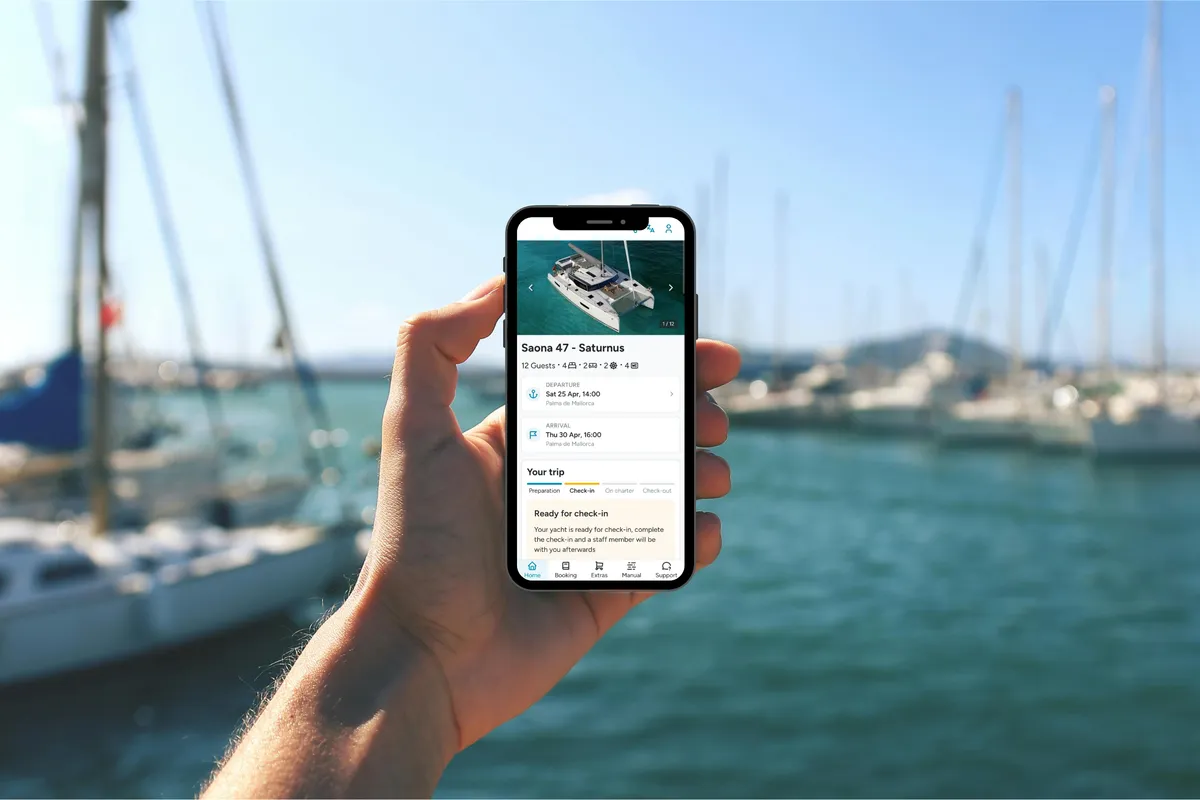
Floatist was designed to make charter operations more clear, efficient, and professional, and charter guests notice the difference each time they step onboard a charter boat. When charter companies use Floatist, guests receive access to a dedicated app containing yacht manuals, equipment guides, troubleshooting instructions, contracts, crew lists, and local information before arrival.
Instead of hunting through drawers for a manual after tripping a breaker, you open the app and find the answer in seconds. That changes the feeling onboard quite a bit. Less confusion. No need to directly call the base manager. More confidence from day one thanks to the charter guest app. The digital check-in also makes the trip enjoyable from the start. Completing contracts, deposits, and passenger lists before arriving at the marina makes check-in noticeably faster.
If you’re booking a charter, it’s worth asking whether the operator uses Floatist or offers similar digital support. You can always ask your agent to look out for a charter company that has the Floatist Badge.
What to Ask Your Charter Company
Not every charter operator has modern systems in place. Some still rely heavily on printed paperwork and rushed dock briefings. Before booking, ask a few simple questions:
- Can documents be completed online before arrival?
- Is there a digital yacht manual?
- Do guests receive troubleshooting guides during the trip?
- Is support available through an app?
- The answers usually tell you a lot about how organized the operation actually is.
Exploring Ashore: Offline Maps for Land Exploration
Half the fun of sailing happens after you drop anchor. Walking through old harbor towns, hiking coastal trails, finding tiny restaurants hidden inland. That’s where offline land maps become useful.
OsmAnd
OsmAnd uses OpenStreetMap data to provide extremely detailed offline maps almost anywhere in the world. Hiking trails, contour lines, walking paths, viewpoints, remote roads. It’s all there. For sailors exploring islands or coastal villages with weak mobile coverage, the app becomes incredibly handy.
Download maps before departure and everything works offline using GPS alone. The interface takes a little time to get used to. Once familiar though, it’s one of the strongest offline mapping tools available.
Free version with limited downloads. Full version around €25 one-time purchase.
Maps.me
Maps.me covers a similar role but feels simpler and faster right away. Searching for restaurants, shops, trails, and attractions offline works smoothly, and the cleaner interface appeals to travelers who don’t need advanced hiking features.
Some sailors prefer OsmAnd for serious exploring. Others stick with Maps.me because it feels lighter and easier to navigate quickly while traveling. Honestly, downloading both isn’t a bad idea.
Free on iOS and Android with optional premium features.
Offline Entertainment for Passages
Long passages leave a surprising amount of downtime. Good offline entertainment becomes valuable quickly once the novelty of staring at the horizon fades.
Podcasts and Audiobooks
Before leaving port, download more content than you think you’ll need. Spotify, Pocket Casts, Audible, and Apple Podcasts all support offline downloads. Audiobooks work particularly well during overnight watches or long motoring days. Sailing podcasts like On The Wind and Liveaboard Sailing Podcast make for great entertainment while staying in the sailing mindset.
Offline Games Offline games are underrated onboard. Chess, Sudoku, card games, crossword apps, and simple puzzle games work well without draining too much battery. For longer passages, games like Mini Metro or Polytopia can easily fill rainy afternoons at anchor.
One important tip: test everything in airplane mode before departure. Some games quietly require periodic internet checks and stop functioning offshore.
Five Apps to Install Before a Charter
If you don’t want endless options and just need a reliable setup before a sailing trip, start here:
- Floatist - digital yacht guides and charter support
- SeaPeople - voyage logging and cruiser community
- Windy - weather forecasts and wind visualization
- Savvy Navvy & Navily - navigation and route planning
- OsmAnd - offline maps ashore
Together, those apps cover navigation, weather, land exploration, social features, and charter logistics without becoming overwhelming.
What to Avoid: Common App Problems
Not every sailing app behaves well once you leave reliable internet behind. A few problems come up repeatedly.
Offline Limitations
“Works offline” means different things depending on the app. Some tools download charts but not tide data. Others require occasional online logins to verify subscriptions. A few break entirely if you accidentally sign out during an update. Always test apps in airplane mode before departure. Properly test them. Open charts, zoom in, load routes, check weather downloads, trigger alarms. You don’t want surprises offshore.
Battery Drain
Marine apps burn through batteries faster than many sailors expect. GPS tracking, AIS overlays, weather animations, and bright chart displays can empty phones in a few hours during active navigation. Portable battery packs help. Dedicated navigation tablets help even more. Screen dimming also makes a big difference during longer days underway. Power management becomes part of the setup surprisingly quickly.
Conclusion
Sailing apps have reached a point where they improve life onboard rather than simply replacing paper charts. But besides what you can do to improve your own experience, it’s worth checking what your charter operator does to improve your holiday, like giving you access to the Floatist Guest App.
Good navigation tools reduce stress. Better weather forecasts make passages safer and more comfortable. Digital cruising guides save time when arriving somewhere unfamiliar. Charter apps remove a lot of confusion during check-in and troubleshooting. The key is choosing apps that still work properly when you lose signal, spend days offshore, or forget to renew a subscription.
Before your next trip, download a few from this list and test everything at home first. Save charts offline. Download maps. Put your phone into airplane mode and see what still functions. That small bit of preparation matters a lot once you leave the dock.